ip
Kai User Guide
Introduction
Kai is a task management application designed to help you keep track of your tasks efficiently. With Kai, you can easily add, manage, and organize your tasks to stay productive and organized.
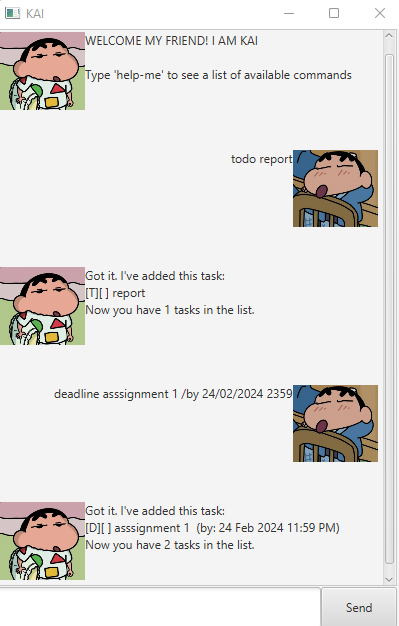
Adding Task
You can add tasks of different types such as todo, event, and deadline to your task list.
1. Todo Task
Example: todo <descrption>
Expected output:
Got it. I've added this tasks:
[T][] <description>
Now you have <number> tasks in the list.
2. Deadline task
Example: event <description> /by <DD/MM/YYYY HHMM>
Expected output:
Got it. I've added this tasks:
[D][] <description> /by <e.g., (24 Jan 2019 2359)>
Now you have <number> tasks in the list.
3. Event task
Example: event <description> /from <date/time> /to <date/time>
Expected output:
Got it. I've added this tasks:
[E][] <description> (from: <date/time> to: <date/time>)
Now you have <number> tasks in the list.
Marking Tasks
You can mark/unmark tasks to keep tack of your progress
1. Mark a Task as Completed
Example: mark <task number>
Expected output:
Nice! I've marked this task as done:
[T/E/D][X] <description>
Now you have <number> tasks in the list.
2. Unmark a Task as Not Completed
Example: unmark <task number>
Expected output:
Ok, I've marked this task as not done yet:
[T/E/D][X] <description>
Deleting Tasks
You can delete tasks from your task list.
Deleting a Task
Example: delete <task number>
Expected output:
Noted. I've removed this task:
[T/E/D][] <description>
Now you have <number> tasks in the list.
Finding Tasks
You can list out all the task based on the keyword
Find Tasks
Example: find <keyword>
Expected output:
Here are the matching tasks in your list:
1. [T][X] <description>
[....]
Listing Tasks
You can list out all the tasks in your tasklist
Listing all Tasks
Example: list
Expected output:
Here are the tasks in your list:
1. [T][X] <description>
2. [E][ ] <description> <date/time>
3. [D][X] <description> <date/time>
Help Command
You can view all available commands and their usage
Using the Help Command
Example: help-me
Expected output:
1. todo [task] : Adds a new task to your to-do list.
2. deadline [task] /by [DD/MM/YYYY HHMM] : Adds a task with a deadline.
3. event [task] /from [when] /to [when] : Adds an event with start and end times.
4. mark [task number] : Mark a task as completed.
5. unmark [task number] : Unmark a completed task.
6. delete [task number] : Deletes a task from the list.
7. find [keyword] : Displays all tasks in your to-do list that contain the keyword.
8. list : Displays all tasks in your to-do list.